
Crossplane v2 - Integrating With AWS ECR
Recently I’ve been playing a lot with Crossplane and I ran up against needing to work with images in a Private ECR Registry.
Crossplane has a built in solution to working with a private image registry using what they call ImageConfigs and a classic ImagePullSecret, you can see a breakdown of how that works in the docs here, but as anyone who has worked with private ECR will know, it is particularly allergic to using static secrets and likes to use STS. In this post I’ll take a look at my suggestions for how to integrate in two scenarios:
- Installing Crossplane (where the installation image comes from a private ECR Registry)
- Installing Providers and Functions from a private ECR Registry

Assumptions
As part of this article, I am going to assume that you have already created some Repositories in your private ECR Registry and managed to get some images in there, I won’t be covering how to go about that or the guide will be too long.
I will be assuming that you have the below Repositories and images created in your ECR Registry (all pulled from xpkg.crossplane.io originally):
- crossplane/crossplane:latest
- upbound/provider-family-aws:v2.2.0
- upbound/provider-aws-s3:v2.1.0
- upbound/function-patch-and-transform:v0.9.0
Installing Crossplane - Configuring NodeGroup Permissions
Despite running two different application Pods, crossplane actually only pulls a single image as part of it’s installation; crossplane/crossplane so that’s one less thing to worry about.
We can most easily ensure that the image can be transparently pulled by expanding the scope of the NodeGroup Instance Role for the Nodes Crossplane will run on to include these additional permissions:
{
  "Version": "2012-10-17",
  "Statement": [
    {
      "Effect": "Allow",
      "Action": [
        "ecr:GetAuthorizationToken"
      ],
      "Resource": "*"
    },
    {
      "Effect": "Allow",
      "Action": [
        "ecr:BatchCheckLayerAvailability",
        "ecr:GetDownloadUrlForLayer",
        "ecr:BatchGetImage"
      ],
      "Resource": [
        "arn:aws:ecr:eu-west-2:1234567890123:crossplane/crossplane" //--Your image repo ARN here
      ]
    }
  ]
}
These permissions can be created as an additional IAM Policy, then bound to your existing NodeGroup Instance Role (if you have multiple NG Instance Roles you can assign this as you see fit). To determine your current NodeGroup Instance Role configuration, use the AWS CLI:
aws eks list-nodegroups --cluster-name tfc-cluster1
{
    "nodegroups": [
        "tooling",
        "regular_workloads",
        "secure_workloads"
    ]
}

aws eks describe-nodegroup --cluster-name tfc-cluster1 --nodegroup-name regular_workloads | grep nodeRole
        "nodeRole": "arn:aws:iam::1234567890123:role/regular_workloads", #--Your NG Instance Role ARN
Installing Crossplane - Service Account Considerations
With this policy in place, the Crossplane image can be pulled, but additional configuration is needed in advance to ensure our Providers and Functions can be installed. Their installation is handled via the Crossplane Service Account which needs to be bound to an existing IAM role with permissions to pull images.
Your IAM role must have at least the permissions shown below:
{
  "Version": "2012-10-17",
  "Statement": [
    {
      "Effect": "Allow",
      "Action": [
        "ecr:GetAuthorizationToken"
      ],
      "Resource": "*"
    },
    {
      "Effect": "Allow",
      "Action": [
        "ecr:BatchCheckLayerAvailability",
        "ecr:GetDownloadUrlForLayer",
        "ecr:BatchGetImage"
      ],
      "Resource": [
        "arn:aws:ecr:eu-west-2:1234567890123:upbound/provider-*", //--Wildcarding is to allow pulling
        "arn:aws:ecr:eu-west-2:1234567890123:upbound/function-*"  //--all Providers and functions
      ]
    }
  ]
}
Once this role exists, Crossplane can be installed with the below Helm Values:
#--helm_values.yaml

image:
  repository: 1234567890123.dkr.ecr.eu-west-2.amazonaws.com/crossplane/crossplane
  tag: latest
serviceAccount:
  customAnnotations:
    eks.amazonaws.com/role-arn: $PROVIDER_AND_FUNCTION_PULL_IAM_ROLE_ARN
Install with
helm install crossplane -n crossplane-system crossplane-stable/crossplane -f helm_values.yaml
Installing Providers and Functions
Once Crossplane is stable, Providers and Functions can be installed, the below image highlights what we’re aiming for:
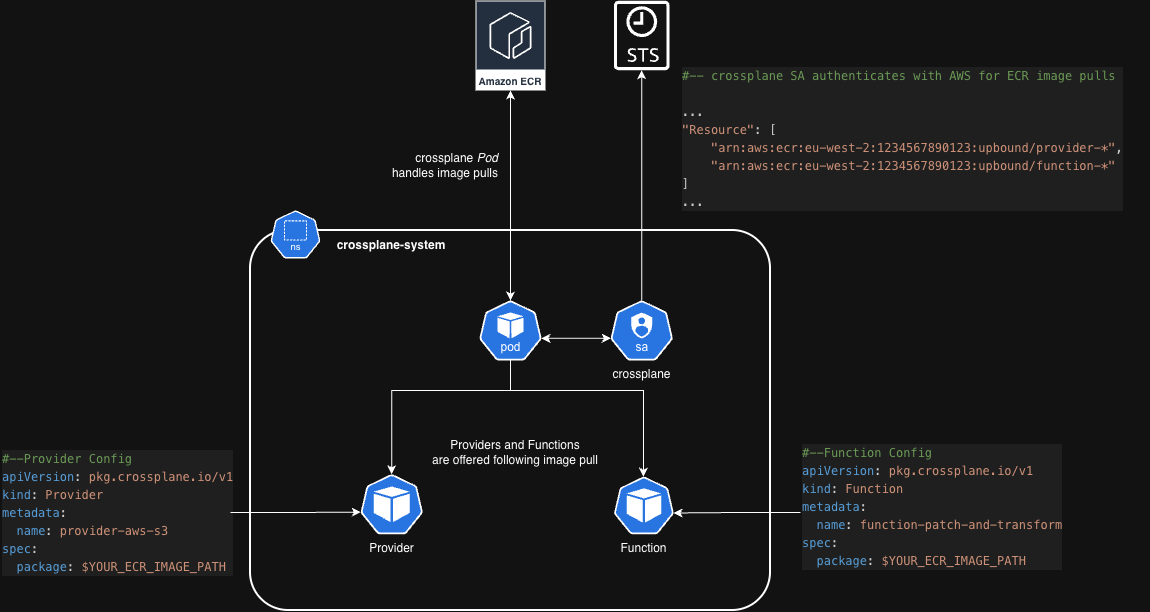
There is an important gotcha when working with a private registry around provider dependencies, these are not perfectly handled and can lead to some very confusing errors and behavior
To highlight how this will behave in reality, if we were to apply the below on a fresh Crossplane deployment:
apiVersion: pkg.crossplane.io/v1
kind: Provider
metadata:
  name: provider-aws-s3
spec:
  package: 1234567890123.dkr.ecr.eu-west-2.amazonaws.com/upbound/provider-aws-s3:v2.2.0
We will see:
kubectl get provider
# NAME                          INSTALLED   HEALTHY   PACKAGE                                                                       AGE
# upbound-provider-family-aws   False       False     xpkg.upbound.io/upbound/upbound-provider-family-aws:v2.2.0                    8m
# provider-aws-s3               True        True      1234567890123.dkr.ecr.eu-west-2.amazonaws.com/upbound/provider-aws-s3:v2.2.0  9m
The dependency upbound-provider-family-aws contains essential dependencies for the s3 Provider to function, as such it has attempted to install automatically. When using a private registry however, this installation will fail, if I remember correctly this is due to a dependency resolution error that occurs when the dependencies have a URI that doesn’t match the Provider (don’t quote me on that, I can’t find my source)!
It is worth pointing out that even if your Provider has somehow managed to install and shows as healthy, but the dependencies haven’t, failures are still going to occur somewhere. These often manifest in in the form of ServiceAccount RBAC errors relating to ProviderConfigs and ProviderConfigUsages. This stems from the fact that when a Provider’s dependencies fail to install, a complete set of CRDs underpinning the Provider have also not been installed. These CRDs are supposed to be part of a ClusterRole that has failed to materialise correctly.
These problems can be pretty confusing, hard to pin down and are really best avoided all together.
To steer clear of this it is best to install both the Providers AND their dependencies manually:
#---Install Deps
apiVersion: pkg.crossplane.io/v1
kind: Provider
metadata:
  name: provider-family-aws
spec:
  package: 1234567890123.dkr.ecr.eu-west-2.amazonaws.com/upbound/provider-family-aws:v2.2.0

#---Install Provider, skipping dependency resolution
apiVersion: pkg.crossplane.io/v1
kind: Provider
metadata:
  name: provider-aws-s3
spec:
  package: 1234567890123.dkr.ecr.eu-west-2.amazonaws.com/upbound/provider-aws-s3:v2.2.0
  skipDependencyResolution: true #--Skip dependency resolution. We have installed manually
                                #--if unset, deps will still be installed from xpkg.upbound.io
We can verify all is well with:
kubectl get provider
# NAME                          INSTALLED   HEALTHY   PACKAGE                                                                       AGE
# upbound-provider-family-aws   True        True      xpkg.upbound.io/upbound/upbound-provider-family-aws:v2.2.0                    12m
# provider-aws-s3               True        True      1234567890123.dkr.ecr.eu-west-2.amazonaws.com/upbound/provider-aws-s3:v2.2.0  11m