
Crossplane v2 - Connecting To A Remote EKS Cluster
Recently I took a look at managing Kubernetes objects using Crossplane. That process was pretty straight forward but it got me thinking about a more complex integration that we sometimes need to do in to in the wild. This is the need to authenticate with with another, remote EKS Cluster and either read from or write to it.
In this scenario the goal is to read/write to a remote EKS Cluster from our existing Crossplane deployment. This one is pretty niche, probably not on many people’s minds and predictably isn’t covered in the documentation…but sooner or later someone is going to want to do it…so here we go!

Jumping Through Hoops
Authentication with EKS can be a bit of an involved process, from a high level, what we’ll need to do in Crossplane is:
- Install the Provider for aws-eks
- Authenticate with the remote EKS Cluster, using an appropriate IAM Role
- Obtain credentials from the remote EKS Cluster, in the form of a kubeconfig
- Install the Provider for kubernetes and configure it with our kubeconfig
- Finally, use the Kubernetes Provider to actually manage resources on the remote EKS Cluster
In practice, that process looks like this:
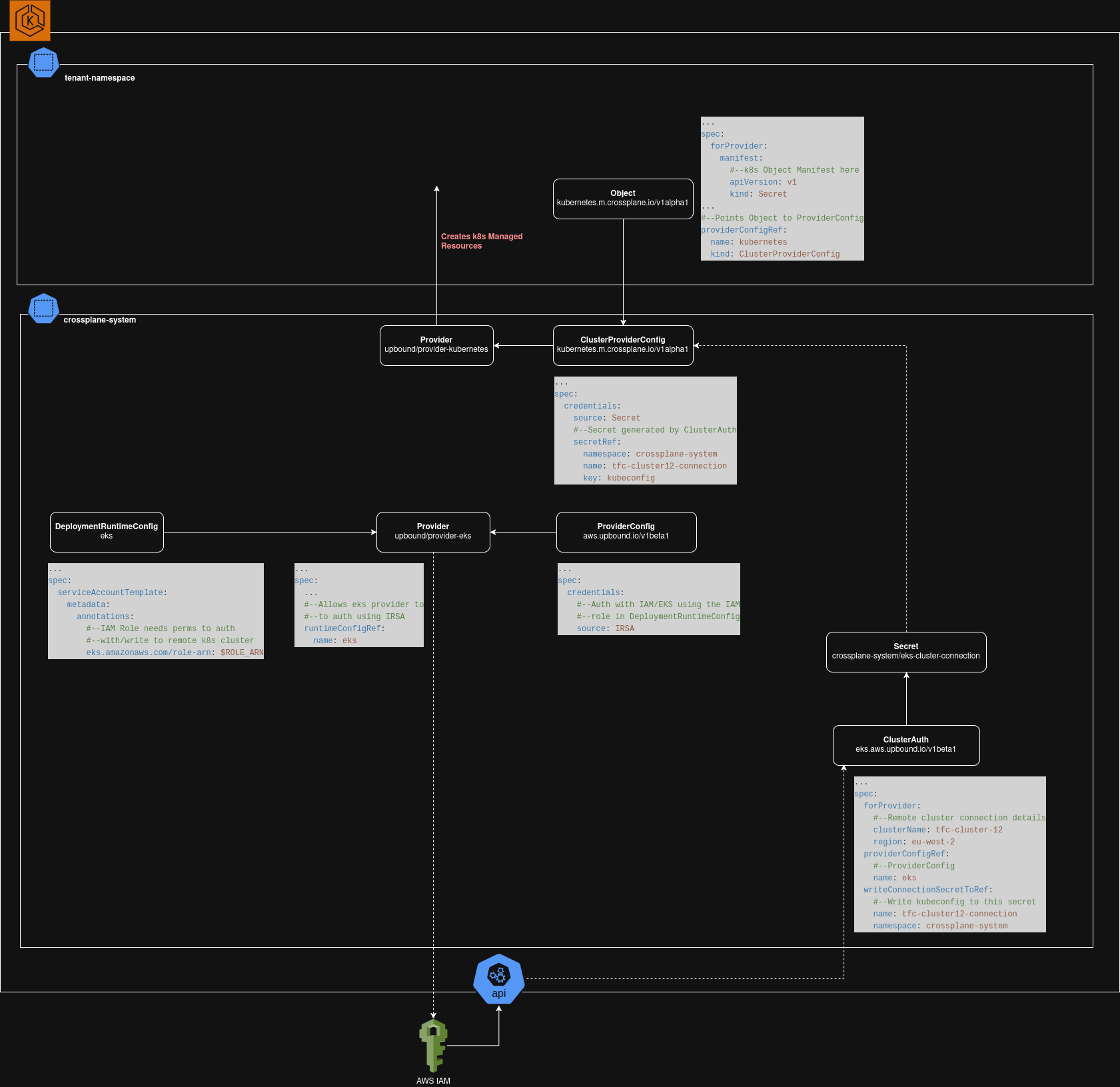
So a lot of moving parts there…but this isn’t as scary as it looks. Mostly this is just the same thing that happens when you type aws eks update-kubeconfig in to the terminal. How hard could it be…
Install and Configure the aws-eks Provider
First we create a DeploymentRuntimeConfig which is linked to an AWS IAM Role. This Role needs to have permissions to authenticate to the remote EKS Cluster and perform whatever management operations you ultimately plan to do.
We will also need to create a Provider using the aws-eks package which uses this RuntimeConfig, and a ProviderConfig configured to use the IRSA credential source.
apiVersion: pkg.crossplane.io/v1beta1
kind: DeploymentRuntimeConfig
metadata:
  name: eks
spec:
  serviceAccountTemplate:
    metadata:
      annotations:
        eks.amazonaws.com/role-arn: $REMOTE_CLUSTER_IAM_ROLE_ARN
---
apiVersion: pkg.crossplane.io/v1
kind: Provider
metadata:
  name: provider-aws-eks
spec:
  package: xpkg.upbound.io/upbound/provider-aws-eks:v2.2.0
  runtimeConfigRef:
    name: eks
---
apiVersion: pkg.crossplane.io/v1
kind: ProviderConfig #--Not cluster-wide. Not for tenant consumption
metadata:
  name: eks
spec:
  credentials:
    source: IRSA #--Auth using IAM role from DeploymentRuntimeConfig
Authenticate With The Remote EKS Cluster
The aws-eks Provider provides a Managed Resource called ClusterAuth. It’s purpose is to perform STS authentication with a remote EKS Cluster. Pairing this with Crossplane’s writeConnectionSecretToRef functionality, we can authenticate and write the output of the authentication process to a secret on our cluster.
apiVersion: eks.aws.upbound.io/v1beta1
kind: ClusterAuth
metadata:
  name: tfc-cluster12
spec:
  forProvider:
    clusterName: tfc-cluster12 #--Remote EKS Cluster name
    region: eu-west-2
  providerConfigRef:
    name: eks
  #--Write connection params, including kubeconf out to a Secret
  writeConnectionSecretToRef:
    name: tfc-cluster12-connection
    namespace: crossplane-system
Install and Configure kubernetes Provider
The kubeconfig to authenticate with the remote cluster is now saved as the key kubeconfig inside the Secret crossplane-system/tfc-cluster12-connection. Using this, we can install the Kubernetes Provider and configure a ClusterProviderConfig which uses the kubeconfig for authentication:
apiVersion: pkg.crossplane.io/v1
kind: Provider
metadata:
  name: provider-kubernetes
spec:
  package: xpkg.upbound.io/upbound/provider-kubernetes:v1.1.0
---
apiVersion: kubernetes.m.crossplane.io/v1alpha1 #--Namespaced endpoint. Allows namespaced MR creation
kind: ClusterProviderConfig #--ClusterWide, one provider for all tenants
metadata:
  name: kubernetes
spec:
  credentials: #--Retrieved from ClusterAuth writeConnectionSecretToRef
    source: Secret
    secretRef:
      namespace: crossplane-system
      name: tfc-cluster12-connection #--Secret name
      key: kubeconfig #--key name inside Secret
Create A Managed Resource on the Remote EKS Cluster
With this all configured, we can finally create objects on the remote EKS Cluster by linking an object to our Kubernetes Provider as shown below:
apiVersion: kubernetes.m.crossplane.io/v1alpha1 #--Namespaced MR
kind: Object
metadata:
  name: tfc-example-secret
spec:
  forProvider:
    manifest:
      #--Begin Kubernetes object manifest
      apiVersion: v1
      kind: Secret
      metadata:
        name: tfc-example-secret
        namespace: cluster12-tenant1
      data:
        secret_information: c29tZXJ1YmJpc2gK
      #--End kubernetes object manifest
  providerConfigRef:
    name: kubernetes #--Created above, authed to remote cluster
    kind: ClusterProviderConfig